 AXENOR
Client portals in Cyprus. Stop onboarding by email.
Client portal development for Cyprus firms: a branded portal that qualifies leads, collects documents and keeps clients in your system. Nothing goes out without your approval.
Clients
24/7
A branded portal your clients open at any hour: status, documents and next steps, without emailing you first.
One
1 pipeline
Every enquiry, document and deadline in one system, so nothing hides in an inbox.
Always
100%
In your control. Approval gates on everything that leaves, so nothing reaches a client without your sign-off.
Inside Client Platforms.
The six pieces we build, from the screen a client logs into to the servers it runs on.
01 / 06
Client Portals
A branded login where your clients upload documents, sign off and track progress themselves. Status lives on the page, so the same question stops landing in your inbox.
Your brand02 / 06
Onboarding Systems
Forms, document requests and checklists that replace the email back-and-forth. Your client sees what is missing; you see who is stuck.
No chasing03 / 06
CRM Setup & Hosting
Contacts, pipeline and follow-ups in one system your team actually opens. We host it and keep it maintained, so there is no admin seat for you to babysit.
Hosted04 / 06
Custom Business Applications
Internal tools shaped around how you work: quoting, approvals, reporting. Built to your process, so your team stops bending to someone else's software.
Your process05 / 06
Integrations
Connected to the email, calendar, accounting and payment tools you already use. Enter data once and it lands everywhere it should.
No re-typing06 / 06
Hosting, Backups & Security
We run, patch, back up and monitor your software on infrastructure we manage. When something breaks, fixing it is our job, not yours.
Backed upYour onboarding is a spreadsheet. Your competitors' is a portal.
The same intake, on a page that carries your name. Your client uploads once, the checklist keeps itself, and every step lands in your queue instead of your inbox.
What your client sees
Your firm
Client portal
- Certificate of incorporationUploaded from the phone, no attachment neededRequested
- Proof of addressAny utility bill from the last three monthsRequested
- Engagement letterRead and signed inside the portalRequested
0 of 3 complete
What you see
Held for your approval


Your client portal
Your approvals
Documents, payments and messages arrive from the tools you already pay for. Anything going back to a client waits in your approvals first.
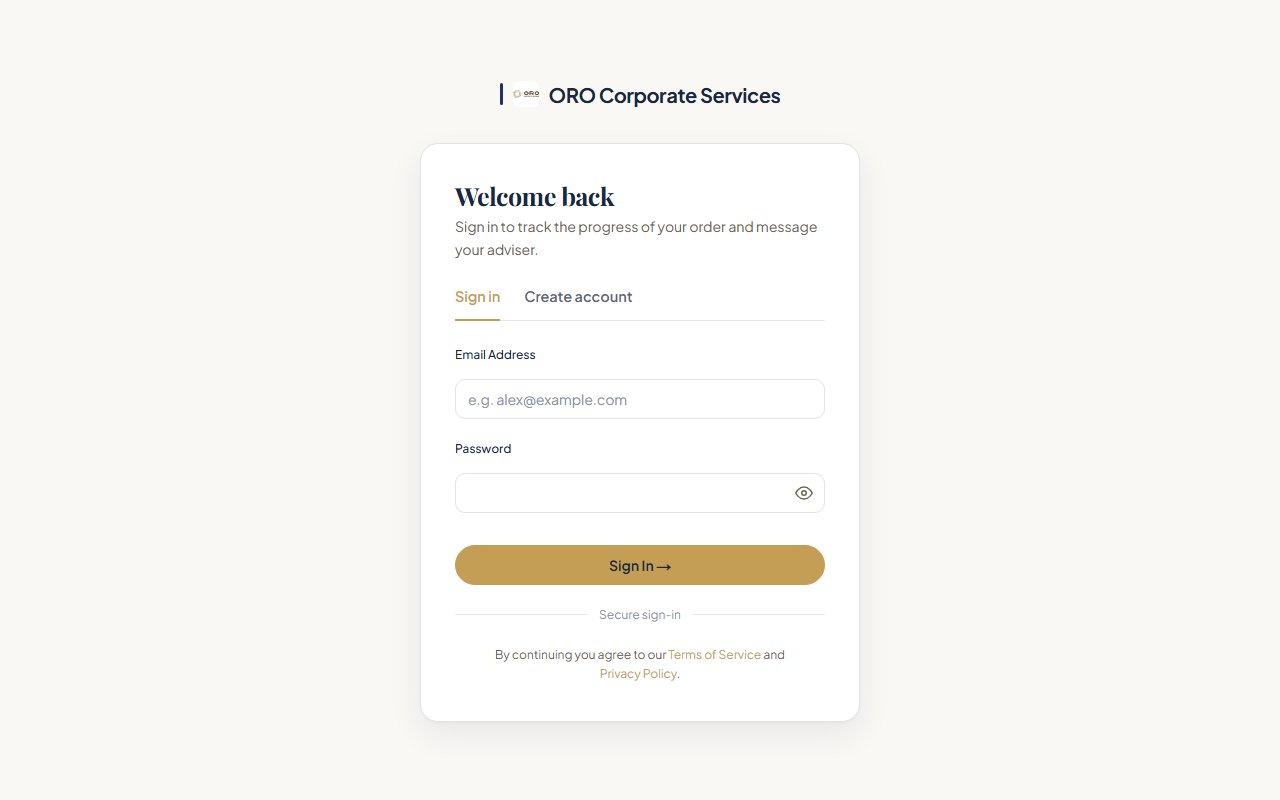
The portal we built for ORO Corporate Services.
A corporate services firm in Nicosia. This is the screen their clients meet. Pick a part of it to see what it does.
Their brand at the door
The client's first screen carries their mark, their type and their bronze palette. Our name appears nowhere on it. The platform is ours to run, the brand is theirs.
Website approved. Launch follows the portal sign-off.
ORO Corporate Services, Nicosia. We built the brand, the website and this client portal for onboarding and document intake. The login and portal page are with the client for sign-off, so nothing here is live yet.
Want your clients to open this instead of an email thread?
Connects with your tools.
A portal is no use as another island. It reads from and writes to the accounting, email, storage and payment tools you already pay for, so nobody types the same detail twice.
- XeroAccounting
 QuickBooksAccounting
- StripePayments and deposits
 HubSpotCRM and pipeline
- GmailEmail
 Google CalendarScheduling
 CalendlyBooking
- Google DriveDocument storage
 DropboxDocument storage
 NotionInternal docs
 AirtableFlexible databases
 SlackTeam communication
- WhatsAppClient messaging
 ZapierAutomation platform
 MakeWorkflow automation
 OpenAIAI models
How it works.
Three steps from email chaos to a branded portal.
Map the workflow
We chart how a client moves through your firm today and mark where the friction lives.
Build and connect
We build your branded portal and wire it to the email, calendar and accounting tools you already use.
Onboard your clients
We migrate your first clients alongside you and tune the flow until nobody has to ask where things stand.
Questions, answered.
Straight answers, before you plan your portal.

What is a client portal?
A branded website your clients log into to upload documents, sign off and see where things stand, instead of emailing you to ask. For a firm it replaces the onboarding back-and-forth: forms and document requests show your client what is missing, and show you who is stuck.
How much does a client portal cost?
It depends on the steps in your onboarding and the tools the portal has to connect to, so we map those first and price it after a short discovery call, in writing, before anything is built. Before that call you can open a live platform we built: the Amazons House member app, with sign-up, member login and staff sign-in on a Cyprus gym's own site. See the Amazons House build.
How long does it take to launch a client portal?
It ships in phases you can see. We chart how a client moves through your firm today, build the portal and wire it to your tools, then move your first clients onto it alongside you and tune the flow until nobody has to ask where things stand.
Will it work with the software we already use?
Yes. The portal connects to the email, calendar, accounting and payment tools you already use, from Xero and Stripe to Gmail, Google Drive and WhatsApp, so data is entered once and lands everywhere it should.
Can anything reach our clients without our approval?
No. Approval gates sit on everything that leaves, so nothing reaches a client without your sign-off. Anything the portal prepares for a client waits in your approvals until you release it.
How do you handle our clients' personal data?
Documents live in the portal behind a login instead of in email threads, and we host, patch, back up and monitor the system on infrastructure we manage. Before any personal data moves, we sign a data processing agreement with you that sets out what is held and why.
Can our clients use the portal on their phones?
Yes. Your client opens one link on a phone, uploads what you asked for and sees the status on the same page, so the same question stops landing in your inbox.
Who owns the portal and the data in it?
You do. The code, the data and every account are yours and in your name from day one. We run and maintain the portal for you, but if we ever part ways you keep the whole system, with nothing to buy back.
Still deciding? Open the member app we built for Amazons House, live on the gym's own site, and picture your logo on it.
Onboarding by email is a choice.
See a portal run end to end, and picture your logo on it.
3 steps
Map the workflow, build and connect, onboard your clients.
1 link
Three documents, one link your client opens on a phone. Nothing to chase by email.
16 tools
Named above, from Xero and Stripe to Gmail, Drive and WhatsApp, all feeding one record.
More from the same team.
Every service is run by the Axenor Consulting team, so what we build and what we grow works from one plan.